

Share Your Refund Request Link
Refund requests arrive by email, text, and DM, in no particular format, usually without an order number. The refund request link replaces all of that with one form. Each event has its own link, and a request made through it can only ever be about that event.
Where to find it
- 1. Open your event from My Events.
- 2. On the event overview, scroll to the REFUND REQUEST LINK card.
- 3. Click Copy.
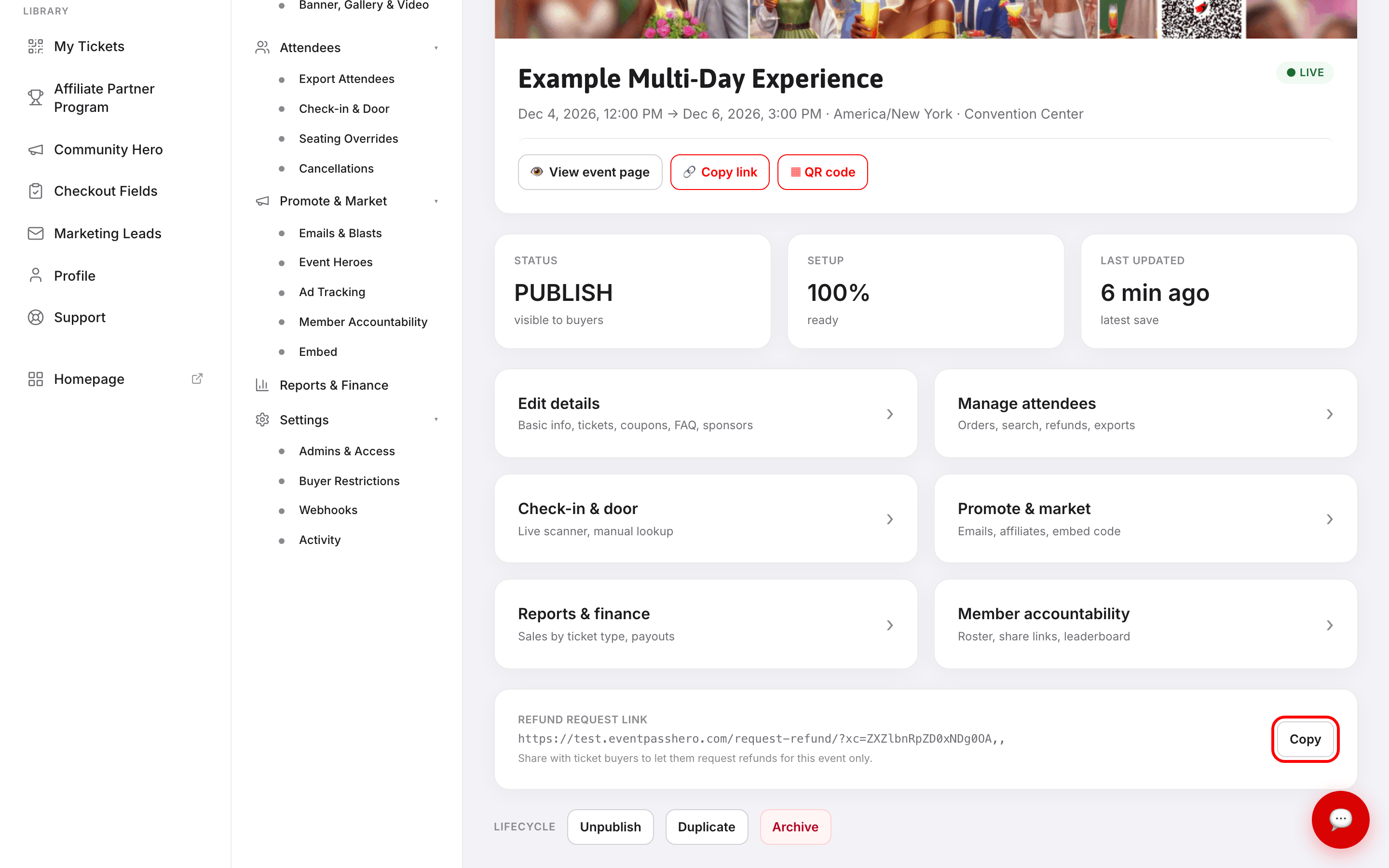
The card sits under the event actions and reads Share with ticket buyers to let them request refunds for this event only. The link is a plain URL — paste it anywhere you'd paste a web address.
Good places to put it:
- In your order confirmation message, so it goes out with every ticket.
- In an email blast when plans change.
- In your event description, near your refund policy.
- In a reply to anyone who asks.
What buyers see
The link opens Submit a Ticket Order Refund Request, with your event name already filled in — buyers never have to identify which event they're writing about.
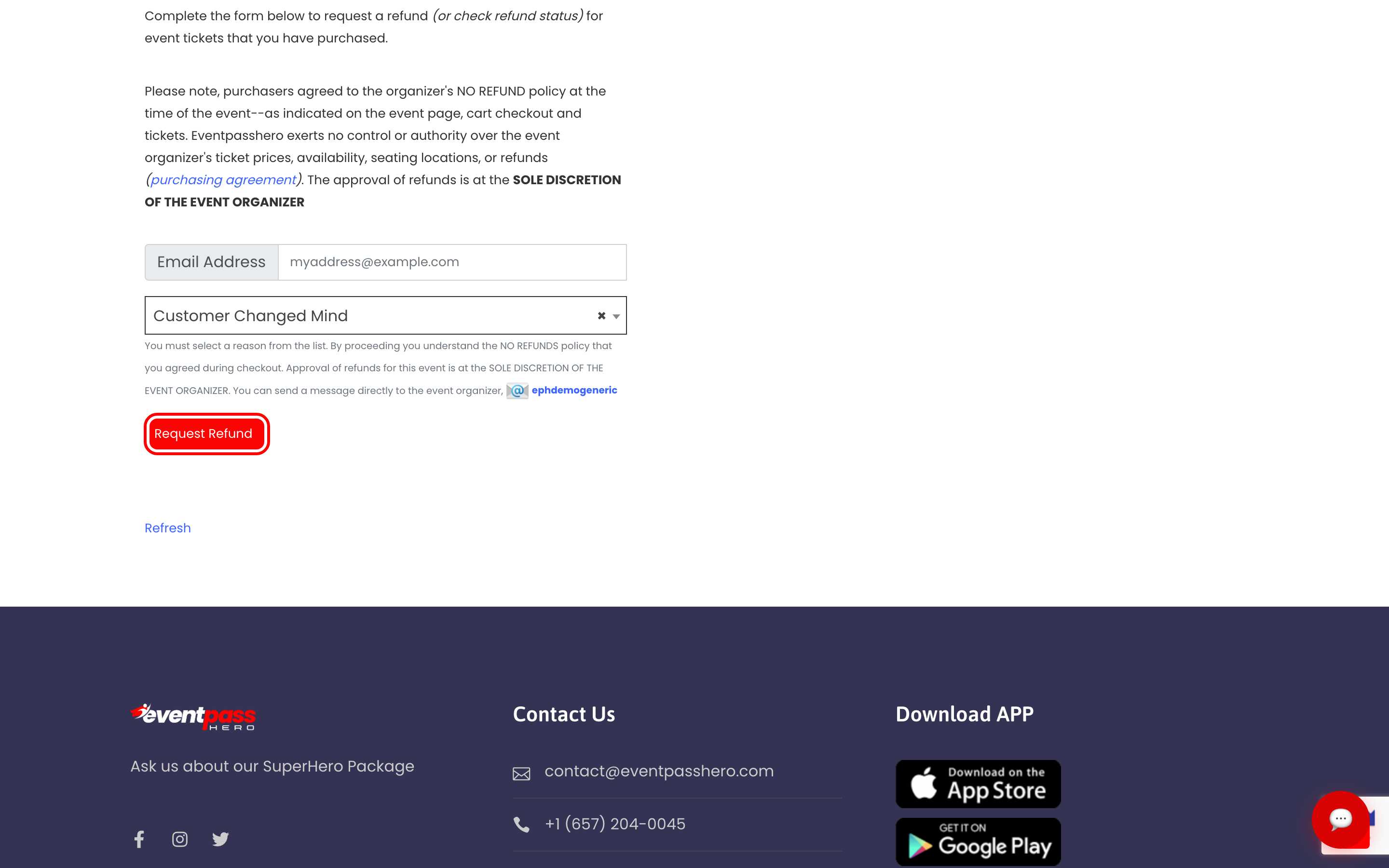
They enter:
- Email Address — the one they bought with.
- A reason, chosen from a fixed list: Customer Changed Mind, Customer Can't Attend (Scheduling Conflict), Customer Bought Wrong Item, Event Didn't Match Description, Event Postponed, or Event Cancelled.
Then they click Request Refund.
The same page is also where buyers check the status of a request they've already sent, so you don't have to answer "did you get my email?"
The policy language on the page
The page states plainly that buyers agreed to the organizer's NO REFUND policy at checkout, that EventPassHero has no control over your prices, availability, seating, or refunds, and that approval is at the sole discretion of the event organizer.
That wording is deliberate. It sets expectations before someone submits, so a request reads as a request rather than an entitlement. It also makes clear that the decision is yours, not ours — nobody is refunded automatically by filling in this form.
There's a line at the bottom pointing buyers to message you directly as well, so a request never becomes a dead end.
After a request comes in
Reviewing and issuing the refund happens on your side, in the event's order tools. The form starts the conversation; it doesn't move money.
Whatever you decide, decide it consistently — the reason list gives you a natural way to be even-handed. If you refund one Customer Can't Attend you'll likely be asked to refund the next.
Troubleshooting
- The card isn't on my event hub — the link only appears once the event can generate one. Save and publish the event, then reload.
- A buyer says the form doesn't recognise their email — they must use the address the order was placed with, not a forwarding address or a partner's. Check the order's email in your attendee export and send them the exact one.
- Someone sent a request for the wrong event — each link is locked to a single event, so the request you receive is definitely about the event whose link they used. If they used the wrong link, send them the right one.
- I don't want to offer refunds at all — then don't publish the link. It's opt-in; nothing is shown to buyers unless you share it. Your refund policy still belongs in your event description and cart message.
- I need to refund everyone at once — a cancelled event is a different job. Don't ask each buyer to submit a form.
Last updated 2026-08-15 · All FAQs & video tutorials