

Every golf tournament committee has the same headache: selling hole sponsorships usually means a volunteer emailing a spreadsheet back and forth — “is Hole 7 still open? what about 12?” — until nobody’s sure who claimed what. That headache disappears when you run golf tournament ticketing the smart way.
Here’s the trick most organizers miss: EventPassHero’s interactive map isn’t just for ballroom seating. It’s a general selectable layout — so you can drop your golf course on it, turn all 18 holes into selectable spots, and let sponsors claim the exact hole they want. No back-and-forth. No spreadsheet. Just tap and done.
Let sponsors claim their hole on an interactive course map
Picture it. Your title sponsor opens the event page, sees a clean map of the course with all 18 holes laid out as numbered markers, and clicks Hole 4 — the one right by the clubhouse where their banner will get the most eyes. The moment they check out, Hole 4 is theirs and it disappears from the map for everyone else. The next sponsor who lands on the page sees 17 holes left, not 18. The map keeps itself honest.
Because the interactive map is really just a layout of selectable spots, each spot can be its own ticket type with its own price. So you’re not stuck charging one flat sponsorship rate. You can price Hole 9 and Hole 18 — the marquee holes at the turn and the finish — as premium spots, and let the rest go at your standard rate. Sponsors see the value, pick accordingly, and pay the premium themselves.
The best sponsorship pitch is the one a sponsor closes themselves — by tapping the exact hole they want and checking out.
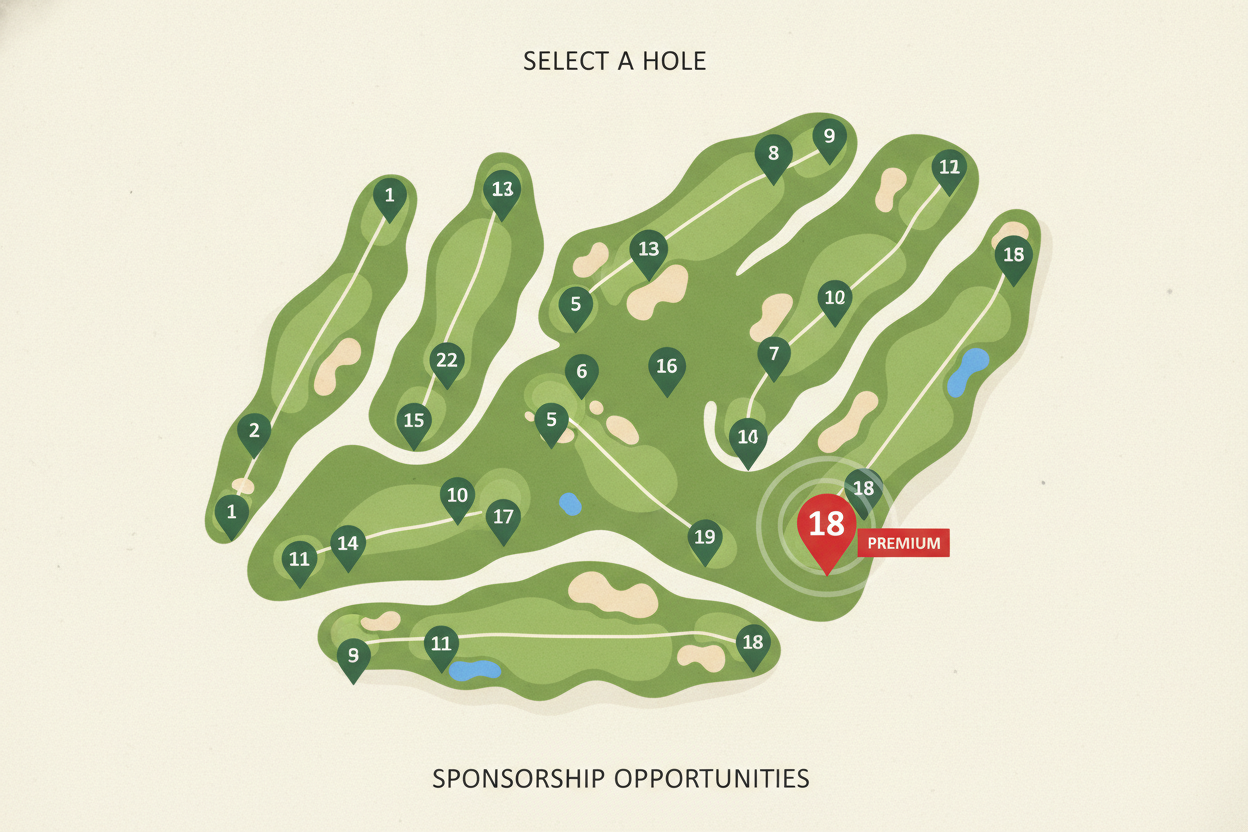
18 holes as selectable spots Premium pricing on Hole 9 & 18 Self-select — no email tag Sold out holes disappear live
Sell a foursome as one bundle that splits into four QR tickets
Golfers rarely register one at a time — they register as a foursome. So sell it that way. A Foursome can be one bundle that a team captain buys in a single checkout, and it splits into four individual QR tickets, one per golfer. At checkout, the captain enters each player’s name and email, so every golfer gets their own ticket instead of the captain forwarding one confirmation and playing traffic cop at the first tee.
That name capture matters more than it sounds. When each golfer has their own ticket, your scoring is cleaner and check-in at the clubhouse moves fast because every player scans in as themselves.
Add-ons that pad your total — mulligans, carts, the awards dinner
The tournament isn’t the only thing you’re selling. The extras are where a golf fundraiser quietly doubles its revenue, and every one of them is just another ticket type or add-on on the same event page:
- Mulligan packs — sell a two- or four-mulligan bundle as its own ticket type. Golfers buy them without blinking, and it’s pure margin for your cause.
- Cart rental — an add-on for teams that want to ride instead of walk.
- Awards dinner — sell dinner seats to players and to guests who aren’t playing, as a separate ticket type.
- Side contests — package skins, longest drive, and closest to the pin as add-ons and collect up front instead of chasing cash on the course.
A branded event page with your sponsors front and center
Your sponsors are paying for visibility, so give it to them before the first ball is even struck. Your event page carries your tournament’s logo, colors, and a hero banner, plus a gallery and sponsor logos — so every hole sponsor gets seen the moment someone lands on the page to register. It’s a live, public thank-you that runs the entire time tickets are on sale.

Track who sold which sponsorships
Fundraising golf lives and dies on hustle, so you want to know who’s actually bringing in sponsors. Member Accountability hands each committee member a personal link, sets a per-member goal, and shows a live leaderboard of who’s selling — plus a one-click board report you can email to your recipients. Hero Affiliates tracks sales credited to individual sellers, so you can see which volunteer’s outreach landed the title hole. Both are tracking tools — they show who sold what without auto-cutting commission checks, so nobody has to reconcile payouts.
Golf tournament ticketing that pays you in 2–3 days
Golf courses want a deposit up front, often months before the tournament. That’s a problem if your ticketing platform sits on your money until the event is over. EventPassHero doesn’t. Payouts run through Stripe Connect on a rolling 2–3 business-day schedule, so the revenue from foursomes and sponsorships lands in your account as it sells — in time to write the course its check. No event-end hold, no minimum, no payout request.
Day-of is just as smooth. Every golfer, sponsor, and dinner guest has a QR ticket, so check-in at the clubhouse is a quick scan in the organizer app, and tickets drop straight into Apple and Google Wallet. One note worth planning for: check-in needs a live connection, and clubhouse Wi-Fi can be spotty — keep a phone hotspot handy as a backup.
Common questions
How do I sell hole sponsorships on a golf course map?
Use EventPassHero’s interactive map as your course layout and make each of the 18 holes a selectable spot. Sponsors open your event page, tap the hole they want, and check out — the hole is instantly theirs and disappears from the map. Because each spot can be its own ticket type, you can price marquee holes higher.
Can I charge more for premium holes like 9 and 18?
Yes. A specific spot on the map can be priced as its own ticket type, so Hole 9 and Hole 18 can simply carry a higher price than the rest. Sponsors see and pick the premium holes themselves at checkout — no separate negotiation required.
How does foursome registration work?
Sell a Foursome as one bundle that a team captain buys in a single checkout. It splits into four individual QR tickets, and the captain enters each golfer’s name and email at checkout, so every player gets their own ticket for fast check-in at the clubhouse.
Can I sell mulligans, cart rentals, and the awards dinner too?
Yes. Each one is just another ticket type or add-on on the same branded event page. Golfers add mulligan packs, cart rentals, and dinner seats to their order and pay once, and it all reconciles in a single dashboard.
When do I get paid for golf tournament ticketing?
Payouts run through Stripe Connect on a rolling 2–3 business-day schedule, so money arrives as tickets and sponsorships sell — not after the event. That’s usually early enough to cover your course deposit, with no event-end hold or minimum.
Related reading
- Interactive Seating explained — the map behind hole selection
- Sell bundles that split into individual tickets
- Custom branded event pages with sponsor logos
The bottom line
A great golf fundraiser isn’t about doing more work — it’s about letting the tools do it. Put your course on the interactive map and sponsors claim their own holes, premium ones included. Sell foursomes as bundles that split into named QR tickets, stack on mulligans and dinner as add-ons, track who’s selling, and get paid in days. That’s golf tournament ticketing that funds the cause instead of exhausting the committee.
Ready to put your course on the map? Create your event and set up your holes and foursomes, or book a quick demo and we’ll map your course with you.

Raise More Money With Less Stress.
Sell more tickets. Stay in control. Built for organizations that move the community.
Start selling tickets →