

You announce the conference, and within a day someone asks the question that always comes up: “Wait — so people buy a ticket and fill out a separate registration form?” And there it is, the tab you didn’t want to open: a Google Form for dietary needs, a Typeform for t-shirt sizes, and a spreadsheet to reconcile it all against who actually paid. Two systems, two exports, one mail-merge headache the week before doors open.
Here’s the better way. With conference registration software built into your ticketing, you capture everything at checkout — no separate form on the side. Ask for title, company, dietary restrictions, track interest, t-shirt size, accessibility needs. Mark the ones that matter as required. It all lives right next to the tickets and payments. One system, one export.
Custom required fields: the registration form, built into checkout
This is the piece that quietly saves the most work. In EventPassHero you add your own custom checkout fields and decide, field by field, which ones a buyer must answer before they can finish the purchase. No answer, no checkout — so you’re not chasing people for a meal choice the night before catering needs the count.
A few fields conference organizers reach for constantly:
- Title & company — for the badge, and for knowing who’s in the room.
- Dietary needs — the count your caterer keeps asking for, collected up front.
- Session or track interest — let registrants tell you which topics pull them, so you can size rooms.
- T-shirt / swag size — order the right run instead of guessing.
- Accessibility needs — captured early, so you have time to accommodate them.
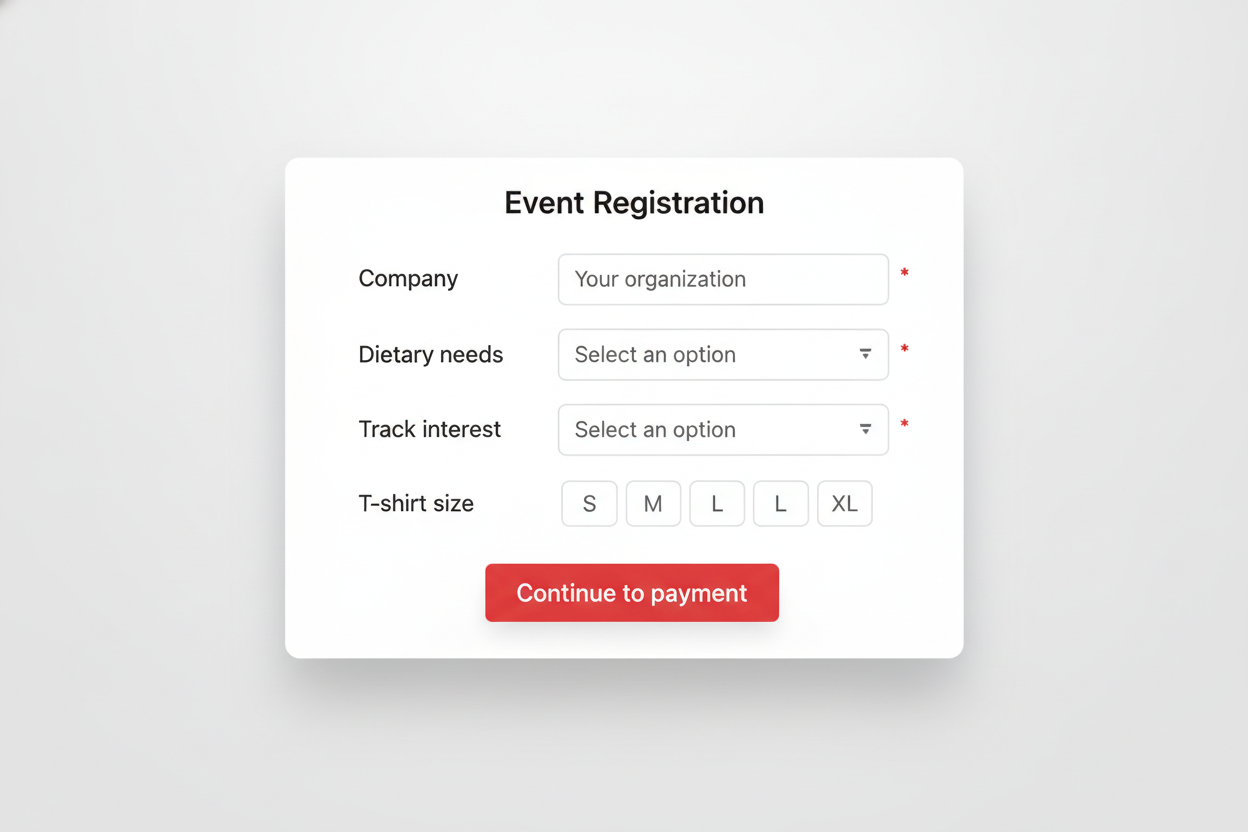
You don’t need a separate registration form. The registration is the checkout — and the answers land in the same place as the payment.
Multi-tier tickets for every kind of attendee
Conferences aren’t one price for one person. Build the tiers your event actually has:
Full conference pass Day pass Student rate Speaker pass VIP or sponsor
Each tier is its own ticket type with its own price and inventory. Your custom fields ride along on all of them, so whether someone buys a full pass or a student ticket, you still capture their company, dietary need, and track interest. Want to keep the speaker or comp tier out of the public flow? Restrict a purchase behind a passcode or a member email list, so only the right people can grab it.
Group registration that splits into named, individual attendees
A lot of conference revenue walks in as a group: a company buys a block for its team, a chapter registers ten members at once. In EventPassHero you sell that as a bundle — one purchase, one payment — that automatically splits into individual tickets, each with its own name, email, and QR code.
The office manager buys the block in one transaction; each teammate is then named on their own ticket. Every attendee gets a pass in their inbox, answers your custom fields, and scans in individually at the door. You get a clean per-person roster; the buyer gets one easy checkout.
A branded page that looks like your conference
Your registration page should read as your summit, not a ticketing vendor’s checkout. Add your logo, colors, a hero banner, and a gallery from last year. And because sponsors underwrite so much of what makes a conference happen, showcase their logos right on the event page — a concrete deliverable for the sponsorship deck: “your logo in front of every registrant.”
QR badge check-in at the door
On event day, your check-in staff open the organizer app and scan attendees in by QR code — fast, individual, and role-limited so scan-only volunteers never see your dashboard or your money. Each person in a bundle has their own QR ticket, so a ten-person block scans in as ten distinct check-ins.
Keep registrants in the loop with email and SMS
Registration doesn’t end at “you’re in.” EventPassHero has built-in email and SMS, so you can send a parking-and-check-in map the week before, a “doors open in an hour” text the morning of, and a thank-you survey after — with audience segmentation, so a note to just your VIPs or just your students is a couple of clicks.
And you get paid while registration is still open
Conferences have real bills before day one — deposits, AV, catering, printing. EventPassHero pays out through Stripe Connect on a 2–3 business-day rolling schedule, so registration revenue funds the event as it comes in — no event-end hold, no minimum, no payout request. The platform fee is a flat 2.75% + $1.49 per ticket (Stripe’s processing fee is separate), with no monthly fees and no contracts.
Common questions
Do I need a separate registration form for my conference?
No. That’s the point of conference registration software built into ticketing. You add custom fields — title, company, dietary needs, track interest, t-shirt size, accessibility — directly to checkout and mark the important ones required. The answers live with the ticket and payment, so there’s no second form and nothing to reconcile.
Can I make certain registration fields required?
Yes. For each custom checkout field you add, you decide whether it’s required. If it is, a buyer can’t finish their purchase until they answer — so you collect the dietary count or shirt size up front instead of chasing it down before the event.
How does group or team registration work?
Sell a bundle: one company or chapter buys a block in a single checkout, and it splits into individual tickets — each with its own name, email, QR code, and answers to your custom fields. You get a clean per-person roster; the buyer gets one transaction.
Can attendees pick which sessions or tracks they’ll attend?
Attendees can tell you their track or session interest through a custom checkout field, which helps you size rooms and plan. EventPassHero collects that interest at registration — it isn’t a personal agenda builder, so use the field to gather preferences and share your schedule alongside it.
How do people check in at the conference?
Your check-in staff scan each attendee’s QR ticket in the organizer app — fast, and per person, including everyone inside a bundle. Scanning needs a live internet connection, so plan on venue Wi-Fi with a phone hotspot as backup at the registration desk.
Related reading
- Custom-branded event pages and sponsors
- Sell bundles that split into individual tickets
- Built-in email & SMS marketing
The bottom line
A conference doesn’t need a ticketing tool and a registration tool duct-taped together. Capture titles, dietary needs, track interest, and shirt sizes as custom required fields at checkout; sell full, day, student, and speaker tiers; register teams as named individual tickets; brand the page; scan badges at the door; and keep everyone updated by email and SMS — all in one place, one export, one payout.
Ready to run registration in one place? Create your event and add your custom fields in minutes, or book a quick demo and we’ll set up your conference registration together.

Raise More Money With Less Stress.
Sell more tickets. Stay in control. Built for organizations that move the community.
Start selling tickets →