

“AI” has become the most overused word in tech. So let’s skip the hype and talk about something concrete: the specific places EventPassHero has wired intelligence into the platform, what you can actually do with it today, and the brand-new web standard we’ve adopted early to make it all work.
Our philosophy is simple. AI should remove busywork for organizers and friction for attendees — without ever taking control away from the humans who matter. That principle shows up in three places you can touch right now: the AI Assist chatbot on our site, the EventPassHero MCP server that lets AI assistants run real platform operations, and our early embrace of WebMCP, a new standard that lets AI agents act directly — and visibly — inside a web page.
1. The friendly front door: AI Assist
Visit eventpasshero.com and you’ll see a red chat bubble in the lower-right corner. Open it and you’ve met Eventpasshero AI Assist — our own AI assistant, built in-house rather than bolted on from a generic chat vendor.
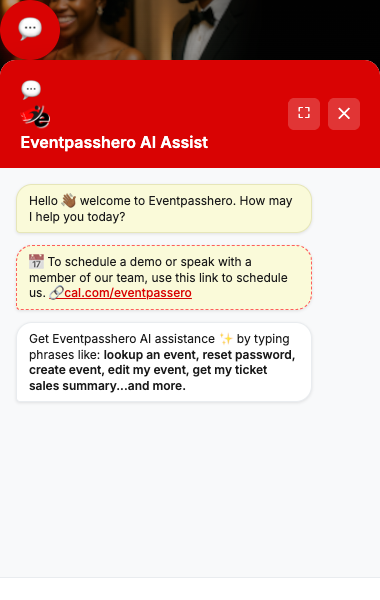
It isn’t a glorified FAQ search. AI Assist is connected to the platform’s real capabilities, so you can type plain-English requests like:
“Look up an event“ “Reset my password“ “Create an event“ “Edit my event“ “Get my ticket sales summary“
For an attendee, that means getting an answer or finding the right event in one sentence instead of hunting through menus. For an organizer, it’s a shortcut into the tools you use most. The reason it can do real work — not just chat — is what’s underneath it.
2. The power tools: the EventPassHero MCP server
Behind the assistant sits mcp.eventpasshero.com, our Model Context Protocol (MCP) server. If you haven’t run into MCP yet, here’s the one-sentence version: MCP is a standard way to give an AI assistant a set of well-defined “tools” it can call — like giving a very capable new hire a labeled control panel instead of a vague job description.
Our MCP server turns the EventPassHero platform into exactly that control panel. Connect a compatible AI assistant (for example, Claude) and it can run genuine operations on your account. A few of the real tools it exposes:
create‑new‑event‑basic‑info
Spin up a new event — title, dates, venue, description — from a conversation.
edit‑event‑ticket‑setup
Add, clone, or adjust ticket types, prices, and limits.
generate‑seating‑map‑from‑event
Produce an interactive seating map from your event’s setup.
search‑ticket‑sales‑transactions
Pull sales by date range, organizer, affiliate, or order ID.
get‑member‑accountability‑stats
See attendance and participation metrics for member organizations.
publish‑event
Take a finished draft live — when you say so.
In practice, an organizer can say something like “Create a gala for August 15th at the Hilton, add Early Bird and VIP tickets, then generate a seating map” — and the assistant carries out each step against the live platform. That’s dozens of menu clicks collapsed into a sentence. There’s a whole catalog beyond these: coupons, sponsors, gallery images, marketing leads, refunds, member rosters, Stripe balance lookups, and more.
3. The new frontier: WebMCP, in the browser
Here’s where it gets genuinely cutting-edge. A traditional MCP server (like the one above) runs behind the scenes. But what about the moment a shopper is standing on your event page, ready to buy? That’s the problem WebMCP solves — and EventPassHero is among the first ticketing platforms to ship it.
WebMCP is, in Google Chrome’s words, “a proposed web standard to help you build and expose structured tools for AI agents.” Until now, when an AI agent tried to use a website it had to guess — squinting at the screen and simulating clicks, which is slow and error-prone. WebMCP lets a page simply declare what it can do, so an agent calls a named tool instead of fumbling with pixels.

Two things make WebMCP special, and both line up perfectly with how we already think about trust:
- It runs visibly, in your page. Chrome notes that WebMCP tools “execute on your webpage visibly, so users gain trust that tasks are completed as expected.” Nothing happens in a hidden backroom — you see the cart fill up in real time.
- It’s structured, not guesswork. The standard is built on three pillars: Discovery (a page registers tools like
checkoutorfilter_results), JSON Schemas (“explicit definitions of inputs and expected outputs, to reduce hallucination or misunderstanding”), and State (“a shared understanding of the current page context”).
On EventPassHero, our Phase 1 WebMCP rollout already registers 20+ tools across the pages that matter to buyers. A sampling:
search_events get_ticket_types get_cart set_ticket_quantity apply_promo_code estimate_pricing search_faq get_checkout_readiness
So a shopper using an AI-enabled browser could say “Find the Atlanta scholarship gala, add two VIP tickets, and apply my early-bird code” — and watch each step happen on the page itself. There’s even a guided event-draft wizard (fill_contact_info, fill_event_details, add_ticket_row) so a brand-new organizer can sketch out an event conversationally before ever creating an account.
Designed with hard limits — on purpose
This is the part we’re proudest of. Just because an agent could do something doesn’t mean it should. Our WebMCP tools draw deliberate lines around the moments that must stay human:
- Payment is human-only. There is no “submit payment” tool. An agent can get your cart 100% checkout-ready and hand you the wheel — you click Pay.
- Seat selection stays with you. If a ticket needs a specific seat, the tool politely stops and points you to the visual seat picker.
- Account creation is human-only. Agents can prepare a draft; creating the account is your call.
- Promo codes come from you. The agent can apply a code you provide — it never tries to discover codes on its own.
For the technically curious
If you build for the web, here’s a peek under the hood. Each WebMCP tool is registered with the browser’s emerging navigator.modelContext API. We scope every tool to an AbortController signal, so when you navigate away the page cleanly unregisters its tools — no stale capabilities lingering around:
navigator.modelContext.registerTool({
  name: "set_ticket_quantity",
  description: "Set the absolute quantity for a ticket type (bounded by min/max).",
  inputSchema: {
    type: "object",
    properties: {
      ticket_type_id: { type: "string" },
      quantity:       { type: "integer", minimum: 0 }
    },
    required: ["ticket_type_id", "quantity"]
  },
  async execute({ ticket_type_id, quantity }) {
    // Updates the live cart UI — visibly — and returns a structured snapshot.
    // If the ticket requires a seat, returns a constraint instead of guessing.
    return await ephCart.setQuantity(ticket_type_id, quantity);
  }
}, { signal: pageAbortController.signal });
The JSON Schema isn’t decoration — it’s what lets the agent map a sentence like “two VIP tickets” onto the exact arguments the tool expects, instead of hallucinating field names.
The buyer-facing tools are backed by fast, public API endpoints — for example, a slim events feed and a canonical pricing-rate source — so discovery and pricing answers stay consistent whether they come from the chatbot, the MCP server, or a WebMCP tool. One source of truth, three front doors.
WebMCP is early — Chrome describes it as “under active discussion and subject to change,” with availability “in an origin trial in Chrome 149,” and the spec stewarded by the Web Machine Learning Community Group. We’re building alongside the standard as it matures, which is exactly why we scoped Phase 1 to safe, read-and-assist actions.
Where this is headed
Today: an AI assistant that does real work, an open MCP server that any compatible agent can drive, and visible in-browser tools that help attendees buy and organizers build. Next: more tools, deeper workflows, and continued investment in the standards that keep your data portable and your experience trustworthy.
The future of events isn’t an AI that replaces the human touch that makes a gala or a conference special. It’s an AI that clears away everything between you and that moment. That’s the future we’re building — and a lot of it is already live.
Curious? Open the AI Assist bubble on eventpasshero.com and ask it to look up an event, or book a quick demo and we’ll show you the rest.

Raise More Money With Less Stress.
Sell more tickets. Stay in control. Built for organizations that move the community.
Start selling tickets →